Orders and parameters
Most common orders are:
| Order | Meaning |
|---|---|
| Iptables-F | flush (erase, emptying) of all rules. |
| IPtables-L | list of rules that are being implemented. |
| Iptables-A | add rule. |
| Iptables-D | delete a rule . |
Most used parameters are:
| Parameter | Meaning |
|---|---|
| -p [protocol] | protocol to which the packet belongs. |
| -s [source] | source address of the packet, can be a hostname, a normal IP address or a network address (mask, so address / mask). |
| -d [destination] | Like the above, it can be a host name, network address, or unique IP address. |
| -i [interface-entry] | Specify the interface on which the packet is received. |
| -o [output-interface] | interface by which to send the packet. |
| [!]-F: | Specifies that the rule refers to second and further fragments of a fragmented packet. If preempts!, Refers only to the first package, or unfragmented packets. |
| -j [target] | Allows you to choose the target to which to send the packet, ie, the action to perform with him. |
For more, you can try typing:
iptables --help
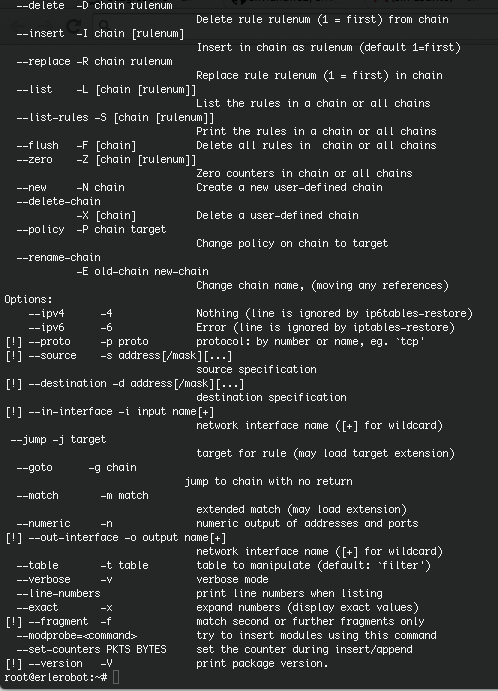
First you may have in to account that if you get this when you use the command line above, you don't need to type -t filter in the following commands:
--table -t table table to manipulate (default: `filter')
To list or consult our firewall rules:
iptables -t filter -L
When calling one of the chains, we do this:
iptables -t <table> -Action <string>
The table is filter, the action can be A,-I,-P or-D (plus other more specific ), With respect to the chain, we have the choice between -INPUT, -OUTPUT ,- FORDWARD .
example:
iptables -t filter -A INPUT
To create a basic firewall that blocks incoming connections only, first we build the policies of the three chains of the filter table:
iptables -t filter -P INPUT DROP
iptables -t filter -P FORWARD ACCEPT
iptables -t filter -P OUTPUT ACCEPT
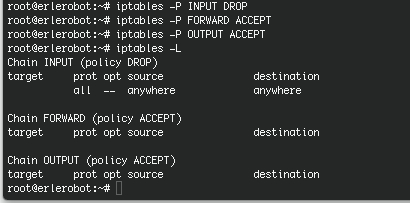
Now for an example of a rule that accepts connections to port 80 of the system:
iptables -A INPUT -i eth0-s 0.0.0.0 / 0-p TCP - dport www-j ACCEPT
And here the description of each component of the above command:
- iptables: Iptables command to (do not forget that the rules are a Shell script)
- A: append option to add the rule
- INPUT: package status (to enter is INPUT)
- i eth0: eth0 network interface
- s 0.0.0.0 / 0: address access (either in this case)
- p TCP: port type
- dport: destination port
- j ACCEPT: packet destination (although it is accepted here could be DROP, LOG, REJECT, ..)
For more info you can visit this two websites:
- Iptables man page(http://ipset.netfilter.org/iptables.man.html)
- Iptables basic guides